The five accounts that need you this week.
We already know which, and why.
As a founder you don't have time to query analytics every Monday. Lunar Dinos synthesizes your product data into account-level stories — which trials are stalling, which accounts are slipping, which are ready for an upgrade — each with context and a specific next step.
The answers exist. Knowing what to ask is the hard part.
PostHog and Amplitude can answer every question in the playbook — if you remember to ask, about the right account, in the right week. Founders don't have that kind of time.
Conversion is a black box
Some trials convert, most don't. You have a sense of why, but you can't point to the specific actions in the first week that predict long-term retention.
Churn catches you off guard
An account goes quiet, nobody notices until the cancellation email. The warning signs were in the product data — login drops, champions going silent, core features abandoned — but nobody stitched the story together in time.
Expansion revenue stays hidden
Accounts hitting plan limits, using power features on the starter plan, adding teammates. All signals that they're ready to upgrade. But nobody connects the usage data to the upsell.
Five accounts and product fixes. Every Monday.
The whole briefing arrives every Monday: TL;DR up top, expanded items with inline evidence below.
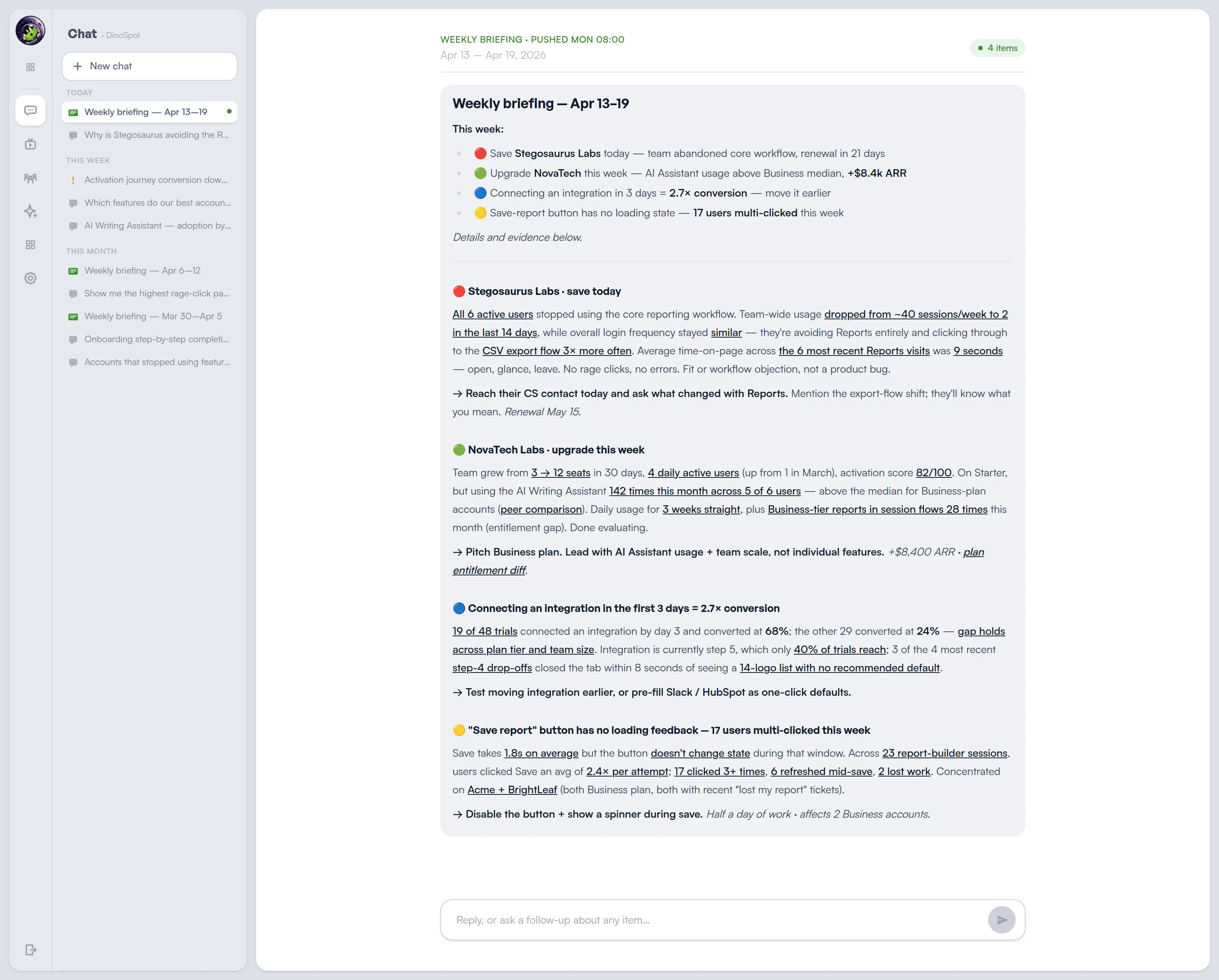
Activation. Churn. Expansion. AI adoption. Covered.
Lunar Dinos delivers the analysis — per account, every week, no prompts.
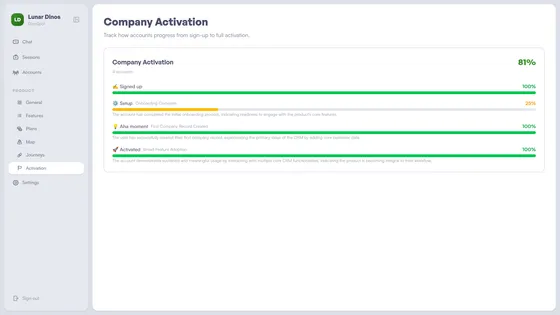
Find what drives conversion
Which actions in the first week predict long-term retention? What do accounts that convert to paid actually do differently? Lunar Dinos discovers activation patterns from real usage and shows you exactly where to focus.
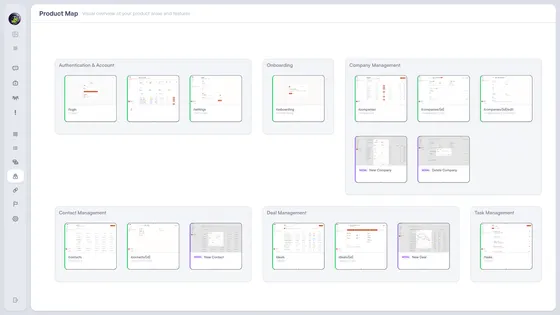
See churn risk early
Login frequency dropping, core features abandoned, activity gaps growing. These signals show up weeks before cancellation. Lunar Dinos monitors them across all accounts and alerts you when risk patterns emerge.
Spot expansion-ready accounts
Accounts hitting plan limits, adding teammates, using power features on the starter plan, connecting a second integration. Lunar Dinos surfaces the combination signals as a specific upgrade opportunity — named account, reason, and the talk track ready for the call.
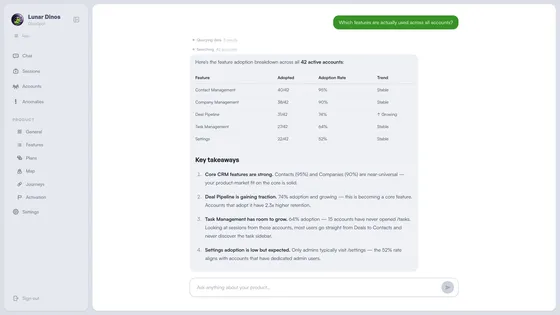
Ship the change your revenue is waiting for
Tell your coding agent what you want to move this week. It investigates the product data, picks the fix with the biggest revenue impact, and writes the code.
MCP server for Claude Code and Cursor
One command connects Lunar Dinos to your agent. From then on it can check activation, churn signals, feature adoption, and structural regressions on its own — before it writes a line of code.
You give intent. The agent grounds itself in real product data, proposes the change with an impact estimate, and opens the PR on approval. Works with Claude Code, Cursor, and any MCP-compatible client.
> What's the highest-leverage code change I could ship this week to
  move revenue? Use lunar-dinos to back it with data.

● I'll look at where revenue is leaking right now — stalled trials,
  churn signals, and recent regressions — then pick the fix with the
  biggest delta.

● lunar-dinos - ask (MCP)
  ⎿  "which product regressions this month correlate with conversion drop?"
     Running: changes(since=30d) → query(events, funnel by release)

     Step 2 → step 3 onboarding completion fell 74% → 51% on Apr 8.
     Correlates with PR #1204 removing the "Skip for now" button on
     /onboarding/connect. 74 sessions abandoned there since; 12 in
     the 30 days prior. Trial-to-paid on that cohort is trending
     -18% week over week.

● lunar-dinos - screenshot (MCP)
  ⎿  route_pattern: /onboarding/connect
     [Image #1 — /onboarding/connect, step 2, no skip affordance]

● Highest-leverage change: restore the skip path on
  /onboarding/connect, but gate it behind a "remind me later" state
  so we don't lose the integration prompt entirely.

  Estimated impact from the pre-Apr-8 baseline: recovering ~23pp of
  step 2→3 completion on ~260 weekly trials ≈ 40–50 additional
  activated accounts/week.

  Plan:
    1. Add SkipLaterButton to OnboardingConnect.tsx
    2. Persist dismissal in onboarding_state, re-prompt on day 3
    3. Emit onboarding_skipped event so lunar-dinos can track recovery

  Proceed?

> go

● Edit(apps/web/src/onboarding/OnboardingConnect.tsx)
  ⎿  Added SkipLaterButton, wired dismissal state.  (+34 −2)


● Edit(apps/web/src/onboarding/state.ts)
  ⎿  Added skippedAt field + day-3 re-prompt hook.   (+18 −0)

● Tests pass. Ready to open PR — title?▋
What lands in your Monday inbox
Each briefing names the account, explains what's happening, and suggests the next move. Five accounts ranked. Read it with your Monday coffee.
Trial stalling
"Trilobite Labs stalled at onboarding step 2 for 4 days. Converting trials complete integration by day 3 at 2.4× the rate."
→ DM the champion today with setup help.
Slipping account
"Rex Systems. Admin hasn't logged in 8 days. Core feature usage dropped 60% in 2 weeks. Renewal in 21 days."
→ Ping CS to book an executive sync this week.
Upgrade-ready
"Pangaea. Team grew 3 → 12 in 30 days. Hit 80% of Starter limits 3× this week. Second integration connected."
→ Make the upgrade call tomorrow.
Product signal
"Onboarding step 3 completion dropped from 74% to 51% since release 3.12."
→ Escalate to PM to check the flow.
Frequently asked questions
How is Lunar Dinos different from PostHog or Amplitude for a founder?
PostHog and Amplitude answer the questions you ask. Lunar Dinos tells you what to act on this week — accounts to call and product fixes to ship — each with the reason and the next step. Founders get the week's priorities without having to query anything.
How long does it take to set up?
Install the SDK. Account-level intelligence starts building from real usage immediately, and the first Monday briefing lands within one to two weeks depending on data volume.
Do I need a data team or analyst?
No. Lunar Dinos is built for founders and small teams without analysts. Briefings arrive in plain English naming the account, the reason it matters, and the next step to take.
Does Lunar Dinos work alongside my existing PostHog or Amplitude setup?
Yes. Many teams keep their current tool for feature flags, experimentation, error tracking, or ad-hoc queries, and use Lunar Dinos for the proactive weekly action recommendations those tools don't produce.
Can I use Lunar Dinos with my coding agent?
Yes. Lunar Dinos ships an MCP server for Claude Code, Cursor, and any MCP-compatible client. Ask about user behavior, inspect sessions, and check feature adoption without leaving your editor.
Five accounts. Five next steps. Every Monday.
Install once. Five ranked accounts, with context and next step, in your inbox every Monday.
Read more: Why We're Building Lunar Dinos